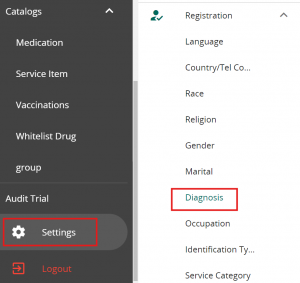
Click on Settings in VandaManager. Click on “Diagnosis” under “Registration”
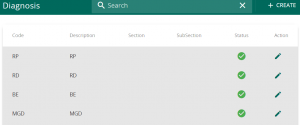
Click on ” + Create “. You may use the pencil icon to edit existing Diagnosis
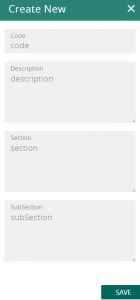
Fill in the following field and save to create a new Diagnosis.

Click on Settings in VandaManager. Click on “Diagnosis” under “Registration”
Click on ” + Create “. You may use the pencil icon to edit existing Diagnosis
Fill in the following field and save to create a new Diagnosis.
Share this article
| Cookie | Duration | Description |
|---|---|---|
| cookielawinfo-checkbox-analytics | 11 months | This cookie is set by GDPR Cookie Consent plugin. The cookie is used to store the user consent for the cookies in the category "Analytics". |
| cookielawinfo-checkbox-functional | 11 months | The cookie is set by GDPR cookie consent to record the user consent for the cookies in the category "Functional". |
| cookielawinfo-checkbox-necessary | 11 months | This cookie is set by GDPR Cookie Consent plugin. The cookies is used to store the user consent for the cookies in the category "Necessary". |
| cookielawinfo-checkbox-others | 11 months | This cookie is set by GDPR Cookie Consent plugin. The cookie is used to store the user consent for the cookies in the category "Other. |
| cookielawinfo-checkbox-performance | 11 months | This cookie is set by GDPR Cookie Consent plugin. The cookie is used to store the user consent for the cookies in the category "Performance". |
| viewed_cookie_policy | 11 months | The cookie is set by the GDPR Cookie Consent plugin and is used to store whether or not user has consented to the use of cookies. It does not store any personal data. |
 English
  Chinese
  Indonesian