
The objective of this guide is to assist user in adding vaccination items into inventory for transaction tracking
Prerequisites
Ensure that vaccination items have been created in Vanda Manager: Create vaccination item
How to add vaccination into inventory
To begin adding the vaccination item into inventory:
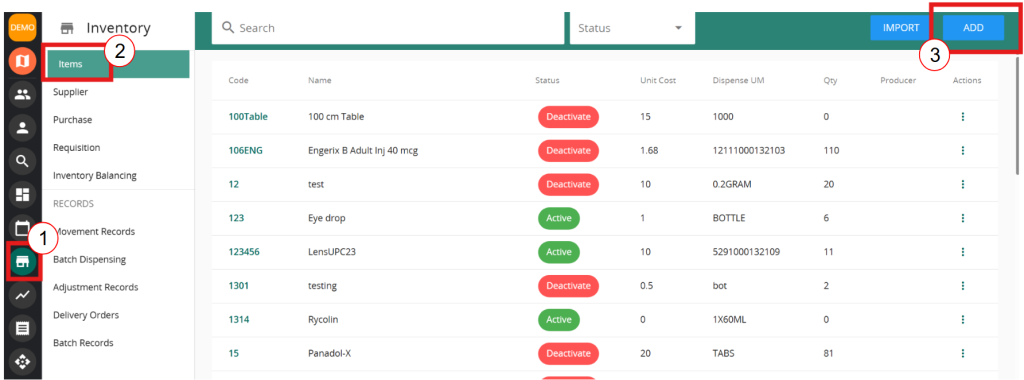
1. Head to VandaClinic’s Inventory
2. Ensure that you are on the “items” page
3. Click on “Add”
Next step
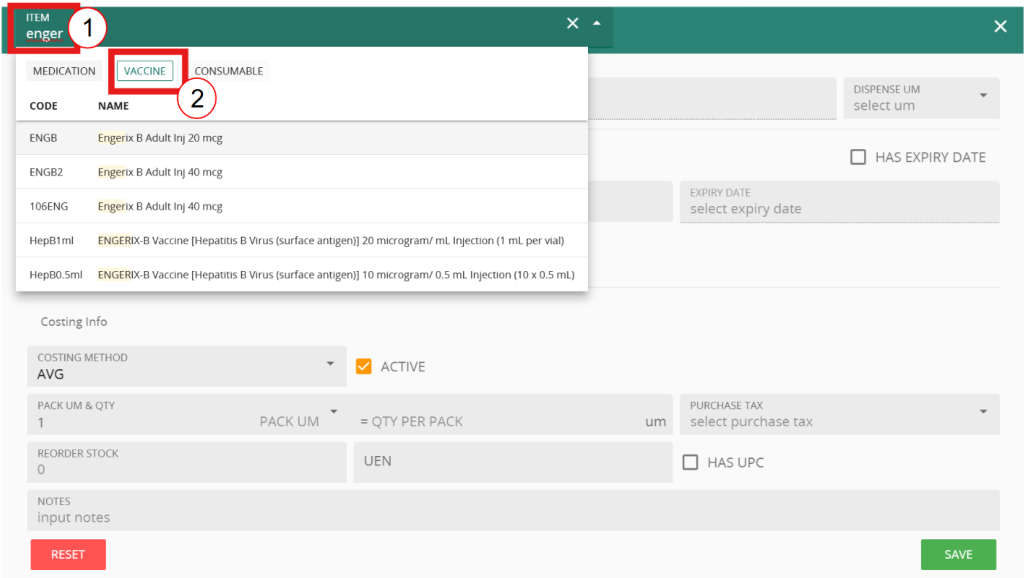
- After clicking on “Add”, you should see this interface. Click on the “Item” text box
- Select Vaccine
- Search for the vaccination to be tracked followed by filling in the item information
- ‘dispense UM‘ is the unit measurement of your item when dispensing this item, for example paracetamol is dispensed by tablets
- Initialisation
- Unit Cost: the cost of the items on hand
- Qty on hand: the amount of quantity on hand currently
- Expiry date: Whether the items has expiry date. This is necessary for FEFO dispensing
- MINI Stock: the minimum stock required by the clinic. This is used for requisition module
- Costing info:
- Costing method: Either AVG or FEFO. AVG: Average stock dispensing. FEFO: First expiry, first out
- PACK UM & Qty: This is setting up the amount of items per pack. e.g 1 box of paracetamol = 10 tablets
- Purchase tax: The tax for purchase
- UEN: Required if UPC tracking is required.
- UPC: Set the upc for existing on hand items
Click on save to start tracking the inventory transaction for the vaccination.
You may add the item to a supplier to conduct Procurement process as well
 English
  Chinese
  Indonesian