
Clinic Queue Management System: How Singapore GP Clinics Are Cutting Wait Times in 2026
See how a clinic queue management system cuts patient wait times, reduces front-desk chaos, and keeps GP clinics in Singapore running smoothly in 2026.

Long queues and calls taking too much time are, for most clinics, a daily reality rather than an occasional bad day. Patients grow frustrated waiting in a crowded reception area with no idea how long is left, front-desk staff spend more time managing crowd control than actual registration, and doctors’ schedules slip further behind with every walk-in. This is exactly the gap a clinic queue management system is built to close.
For clinics evaluating new software in 2026, queue management is often the single feature that delivers the fastest, most visible improvement — both for patients and for staff. Here’s what it actually is, how it works, and what to look for before you choose one.
What Is a Clinic Queue Management System?
A clinic queue management system replaces the manual, first-come-first-served chaos of a waiting room with a digital process. Instead of patients physically lining up or hovering near the counter, they receive a virtual queue number — through a kiosk, a QR code, or the front desk — and are called forward automatically as their turn approaches, often with an SMS or on-screen notification. This is a healthcare-specific application of the same queue management principles used across banking, retail, and government services, adapted to fit clinical registration and patient privacy needs.
The goal isn’t just a nicer-looking waiting room. It’s shorter effective wait times, fewer disputes over “whose turn is it,” and a front desk that can focus on registration and enquiries instead of crowd management.
Why Wait Times Are Still a Problem for Singapore Clinics
Even well-run GP clinics in Singapore struggle with queues during peak hours — weekday mornings, lunchtime, and evenings after work. Common pain points include:
- Patients who don’t know their real position in the queue, leading to repeated front-desk enquiries
- Walk-ins and scheduled appointments competing for the same queue without a clear priority system
- No visibility into wait times, so patients can’t step out to grab lunch or run an errand and return in time
- Front-desk staff acting as informal “queue marshals” instead of processing registrations
These issues compound in multi-branch clinic groups, where each location may be handling queues differently with no shared visibility across branches.
How a Clinic Queue Management System Works
Most modern systems follow the same basic flow, regardless of vendor:
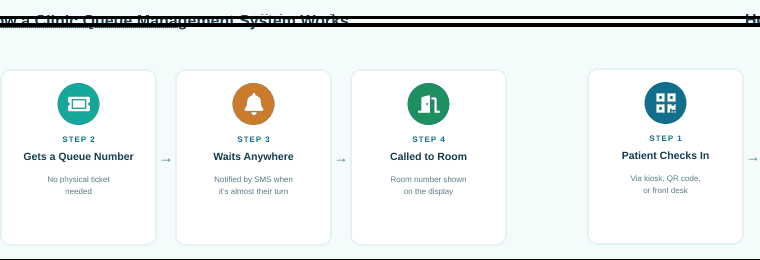
- Patient checks in — via a self-service kiosk, a QR code scan, or the front desk.
- Gets a virtual queue number — no physical ticket required, and no need to keep glancing at a screen in the waiting room.
- Waits anywhere — patients are notified by SMS or app as their turn approaches, freeing them to wait outside, grab a coffee, or sit further from a crowded counter.
- Called to the consultation room — the room or counter number is shown on the display, removing any ambiguity about where to go next.
Key Features to Look For in a Clinic Queue Management System
Not all queue systems are built for healthcare specifically. When evaluating options, look for:
- Virtual queueing with SMS or app notifications, so patients aren’t tied to the waiting room
- Real-time queue displays at reception and consultation areas
- Support for both walk-ins and scheduled appointments in a single, fair queue logic
- Multi-counter and multi-branch support for clinics with more than one doctor or location
- Integration with registration, EMR, and billing, rather than a queue number that lives in its own disconnected app
- Reporting on wait times and patient flow, so clinic owners can see where bottlenecks actually occur
Standalone Queue App vs. an All-in-One Clinic Management System
Many clinics start with a simple, standalone queue ticketing app — and for a very small practice, that can be enough. The limitation shows up as the clinic grows: a queue number that isn’t connected to the patient’s registration or medical record means staff are still re-entering the same information twice, and clinic owners lose the ability to correlate wait times with actual patient outcomes or billing data.
This is the same pattern already familiar to many clinics dealing with outgrown clinic management software — a tool that solved one problem in isolation eventually becomes another disconnected system to maintain. Queue management works best when it’s a feature of the same platform that handles registration, scheduling, and records, not a bolt-on add-on.
How VANDA’s Queue Management Fits Into Your Clinic Workflow
VANDA includes queue management as a built-in part of the Vanda Clinic and Vanda Manager platform — not a separate app clinics need to purchase, license, and maintain on the side. Because it shares the same system as patient registration, appointment scheduling, and medical records, a patient’s queue number is already linked to their profile the moment they check in.
For clinics that have also struggled with missed and late appointments, this connection matters: a unified system can distinguish between a scheduled patient running late and a walk-in, and manage both fairly in the same queue — something a disconnected ticketing app simply can’t do.
Getting Started With a Clinic Queue Management System
If long queues and front-desk congestion are a recurring complaint at your clinic, the fix rarely requires more staff — it requires a system that gives patients visibility and gives your team back the time they currently spend on crowd control. Before committing to any vendor, it’s worth asking:
- Does it integrate with our existing registration and EMR, or does it create a second system to manage?
- Can it handle multiple counters, doctors, or branches as we grow?
- Does it give us reporting we can actually act on, not just a live queue number?
A clinic queue management system built into your core platform — rather than bolted on top of it — tends to answer all three questions at once.
Recent Posts
 CMS
CMS Patient Consent for Insurers: What MOH Circular 02/2026 Means for Singapore Clinics
Patient consent for insurers must be documented under MOH Circular 02/2026. See 5 steps Singapore clinics should take…
 CDMP
CDMP MediSave Chronic and Preventive Care in 2027: What Singapore GP Clinics Need to Update
MediSave Chronic and Preventive Care starts 1 Jan 2027 with higher limits and thyroid conditions added. See the…
 Clinic Insights
 AI Medical Scribe in Singapore: What GP Clinics Should Check Before Adopting One
Thinking of an AI medical scribe for your Singapore clinic? Review data location, CMS fit, consent and sign-off…
Related Posts
Patient Consent for Insurers: What MOH Circular 02/2026 Means for Singapore Clinics
Patient consent for insurers must be documented under MOH Circular 02/2026. See 5 steps Singapore clinics…
Ophthalmology Clinic Software: What Singapore Eye Clinics Should Look For in 2026
Ophthalmology clinic software should handle vision tests, eye exam drawings, and operation notes. See what Singapore…
TCM Clinic Management System: What Singapore TCM Clinics Should Look For in 2026
Choosing a TCM clinic management system in Singapore? See the features that matter: tongue and pulse…